Turn any digital product into a conversational interface
Comandor is a conversational UX layer for any digital product: people ask in their own words, and Comandor answers, acts or starts the right conversation.

From clicks to intent
Digital friction is everything between what people want and the result: menus, search boxes, filters, forms and repetitive clicks. Here is what changes when people can simply ask.

Website
Five pages, three filters and a search with no results
Ask once and get the right product, room or answer

Customer account
Hunt for a setting, then open a support ticket
Say what you need and see it done

Team tools
Search folders, wikis and old chats
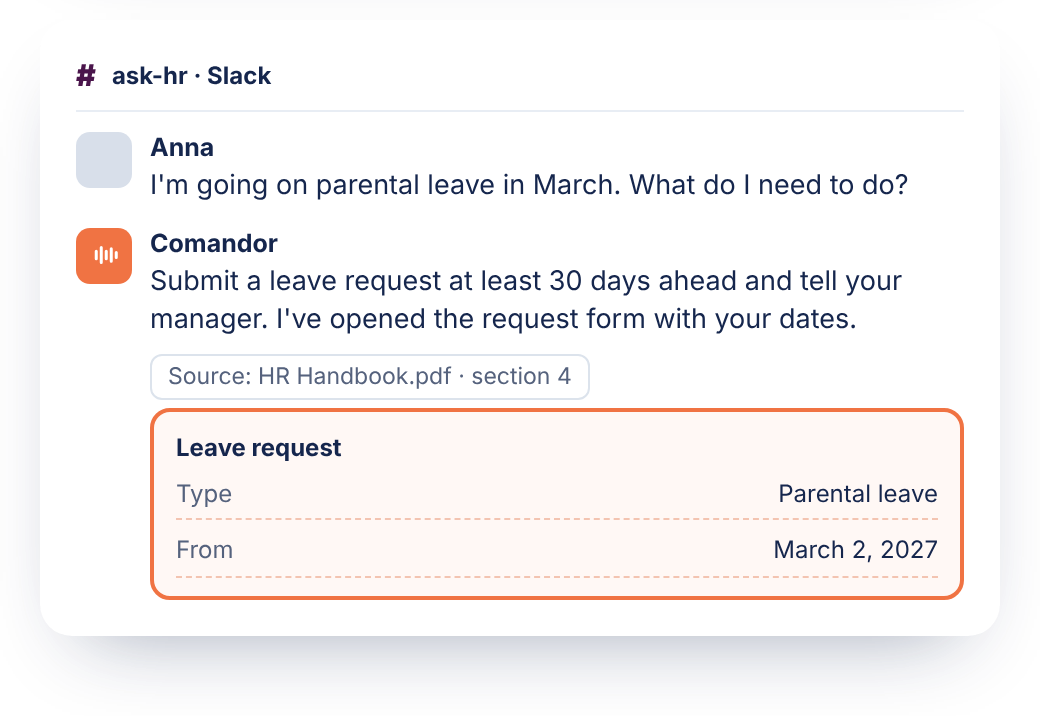
Ask in Teams or Slack and get the answer with its source
What does Comandor do?
Comandor answers questions, carries out tasks and starts the right conversation, inside the interface people already use.

Comandor Answer
Ask anything and get a real answer from your own documents and content, on your website and in your team’s tools.

Comandor Act
Say what you want done and watch it happen in your interface: search, filters, forms. You see every step.

Comandor Engage
Comandor doesn’t wait to be asked. It starts a conversation, or a short survey that adapts to each answer, at the right moment.
Where does Comandor work?
Comandor works wherever people use your digital product: on your website, in your customer account and in your team’s tools. Start with one place and add the others when you’re ready.
For your visitorsFrom browsing to booking.
On your website, visitors find, compare and book without digging through pages.
For your customersGet it done in your account.
In your customer account or web app, people get answers and finish tasks just by asking.
For your teamLess searching, more doing.
In Teams, Slack and your internal tools, employees find answers in company docs and get routine work done.
See Comandor in your industry
One layer, adapted to how your customers search, choose and get things done. Pick your industry to see where Comandor helps first.
Shoppers find the right product in one request instead of five filters.
Can I return them if they don't fit?
Waterproof boots under $150, size 42
Need help choosing between these two?
/industries/e-commerce
Guests get answers and book directly on your site.
Is there parking at the hotel?
A room for two with breakfast, May 12–14
Still deciding? I can compare these rooms.
/industries/hospitality
Travelers plan and book a trip without hunting through pages.
What documents do I need for this trip?
A beach trip in June for two, under €2,000
Traveling with kids? I can show family-friendly options.
/industries/travel
Readers find what they need in your archive and stay to read more.
What have you published on housing prices this year?
Switch my newsletter to weekly
Enjoying these articles? Register to keep reading.
/industries
Customers get answers and finish routine tasks in their account.
What's the fee for transfers abroad?
Download my statement for March
Stuck on the application? I can help you finish it.
/industries
Patients find the right service and form without searching.
How should I prepare for a blood test?
Book a dermatology appointment next week
How was your visit? Two quick questions.
/industries
Users get answers and get things done inside your web app.
How do I add a teammate?
Turn on two-factor login
New to reports? I can walk you through your first one.
/industries
Clients and your team find the right expertise faster.
Do you handle tax for freelancers working abroad?
Start the onboarding form for my company
Tell me a bit about your project, and I'll connect you with the right expert.
/industries
Keep your product.
Add the conversation.
Comandor is added on top of your existing product. You don’t rebuild your website, replace your search or move your content.
Add Comandor to your product
Install it on your website, in your customer account or web app, or connect it to Microsoft Teams and Slack. Installation is simple, and we help you configure it.
Point it to your knowledge
Comandor answers from your own documents, pages and knowledge base, and works with the search, filters and forms you already have.
People ask, Comandor
gets it done
People say or type what they want. Comandor answers, acts in your interface or starts the right conversation, and people see every step.
A typical chatbot tells people where to go. Comandor answers from your own knowledge and finishes the task right where people already work.
Doesn't point the
way. Gets it done.
A chatbot that points the way

A typical chatbot sits in a corner of the page. It answers, then sends people back to find the right page, fill in the form and finish the task themselves.
Comandor gets it done
Comandor works in the interface itself. It answers from your content, opens the right page, applies filters and fills in forms, and people see every step.
See Comandor on your product
Tell us where people get stuck today. We’ll show you how Comandor answers, acts and engages in your own interface.
Let ChatGPT, Claude, or Perplexity analyze it for you
Frequently asked questions
Comandor is a conversational UX layer for any digital product. It turns yourwebsite, customer account or team tools into a conversational interface: people say or type what they want, and Comandor answers it or gets it done inside the interface you already have. One product, three capabilities: Comandor Answer, Comandor Act and Comandor Engage.
A conversational UX layer is software that sits on top of an existing digital product and lets people use it by saying or typing what they want. The layer understands the request and finds, answers or does it in the product's own interface. People no longer have to work through menus, search boxes, filters and forms. Comandor is a conversational UX layer for any digital product: websites, customer accounts and team tools.
A chatbot answers questions in a separate window, mostly for customer support. Comandor works on the product itself. It answers from your own content, and it also runs searches, applies filters, fills in forms and guides people through steps in your interface, with every step visible. With Comandor, people use the website itself through conversation, instead of chatting in a window beside it.
Add a conversational layer on top of the website you already run. With Comandor, visitors type or say what they need — "a quiet double room for two nights next weekend, with breakfast" or "waterproof hiking boots under $150". Comandor answers from your own content, finds the right items and guides people to booking or checkout. Your website, search and booking engine stay as they are.
Comandor is added on top of your existing website and platform, so nothing has to be rebuilt or replaced. The install is simple, and the Comandor team helps configure it for your content and your key tasks. Comandor then works in your site's own interface: people see each result appear on the page they are on.
Yes. Comandor works on top of the site search you already have. Shoppers describe what they need in their own words, for example "a quiet dishwasher that fits under a 60 cm counter". Comandor turns that into the right search, filters and product comparison in your store. Your search vendor, catalog and product data stay as they are.
Yes. Comandor Act carries out tasks in your own interface: it runs searches, sets filters, fills in forms and takes people through multi-step flows such as booking, with every step visible on screen. This is how Comandor replaces digital friction — menus, search boxes, filters, forms and repetitive clicks — with intent.
Yes. Comandor Engage doesn't wait to be asked. When a visitor shows intent — time spent reading, a return visit or signs of leaving — it starts the right conversation, or a short survey that adapts to each answer. Visitors get a conversation instead of a rule-based popup or exit-intent banner.
Yes. Comandor is one layer that works in three places. For your visitors, on your website: from browsing to booking or buying. For your customers, in their customer account or web app: answers and tasks done just by asking. For your team, in Microsoft Teams, Slack and internal tools: answers from company documents, with less time spent searching.
Building in-house with AI SDKs gives full control. But connecting a language model to your content, search and interface takes months of engineering, and the result needs ongoing maintenance. A ready-made layer such as Comandor runs on top of what you already have, so the team starts with the site's key tasks instead of infrastructure. Building makes sense when conversational interfaces are core to your product and you have a dedicated AI team.
Yes. People can use Comandor by saying or typing what they want. Voice works in English, Spanish, French, Russian, German and Polish. Text chat works in 1000+ languages, and people can type in their own language, whatever the language of your interface.
